描述
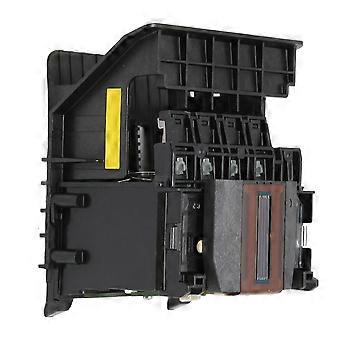
HP 950 8600-8650 Printer Print Head Replacement ABS Material Solution
Item Type: Print Head for HP
Material: ABS
Color: As Pictures Shown
Weight: Approx. 220g / 7.8oz
Application: for HP 950 8600 8610 8620 8650 251DW 276DW
If the printer fails to recognize the print head, the following reasons are common:
1. The ink cartridge is not the original unrecognized print head, so the ink cartridge needs to be replaced.
2. If the metal contact points of the ink cartridge or print head are dirty, use a clean soft cloth or alcohol cotton ball to wipe the metal contact points of the ink cartridge and pen holder, dry them naturally, and then plug them back for testing.
3. If the printer is still unrecognized, reset the print head after restoring the factory settings.
1ABS Materials: Print head is made of high quality ABS materials, it is lightweight, rust resistant, fade resistant and durable.
2Stable Performance: Print head replacement has stable performance and high reliability, suitable for replacing your broken products.
3Applicable Model: Print head replacement is perfectly suitable for HP 950 8600 8610 8620 8650 251DW 276DW printer.
4Guaranteed Quality: functional test after completion of production; functional test before delivery. The quality is guaranteed.
5Good Workmanship: Adopting Exquisite workmanship, beautiful appearance design, providing you great using experience.Solution for incompatibility: Reset the printer
Follow the steps below to reset the printing device.
Turn on the printer (if not already turned on).
Wait for the printer to come to a complete standstill before continuing.
After turning on the printer, disconnect the power cord from the back of the printer.
Unplug the power cord from the wall outlet.
Wait at least 60 seconds.
Plug the power cord back into the wall outlet.
Notice:
For HP recommends plugging the printer power cord directly into a wall outlet.
Reconnect the power cord to the back of the printer.
Turn on the printer (if not already turned on automatically).
The printer may take a while to warm up. The printer lights might be blinking, and the carriage might move.
Wait for the printer to warm up and come to a complete standstill before proceeding.
If the above methods cannot solve the compatibility problem, you need to replace the original ink cartridge and ink.
In the computer printer properties, find the cleaning function and clean the print head.
Precautions:
1. After the print head is disassembled, please do not directly touch it with your hands or wipe the print head chip with rough paper, which will cause chip damage and incompatibility.
2. Replace the original ink cartridges and inks of the machine. The long?term use of the ink cartridges will lead to poor contact of the ink cartridge contacts, and the ink cartridge system cannot be detected.
The product is only suitable for printing weak solvent ink, printing blank and dropping ink. Please turn off the power supply of the printer and install the nozzle to pump and inject ink. After several times of cleaning, empty the inside and drain it. If it is still blank, replace the printer cable.1 x PrintHead
-
Fruugo ID:
310719540-694687704
-
EAN:
6934781704892