Usb External Volume Control Adjust Knob Bluetooth 5.1 With Play Pause Skip Mute 3 Volume Control Mo

$35.95
免费送货

Usb External Volume Control Adjust Knob Bluetooth 5.1 With Play Pause Skip Mute 3 Volume Control Mo

  • 品牌: Unbranded

Usb External Volume Control Adjust Knob Bluetooth 5.1 With Play Pause Skip Mute 3 Volume Control Mo

  • 品牌: Unbranded
价格: $35.95
由……售出:
$35.95
免费送货

有货

14天退货政策

付款方式:

描述

Usb External Volume Control Adjust Knob Bluetooth 5.1 With Play Pause Skip Mute 3 Volume Control Mo

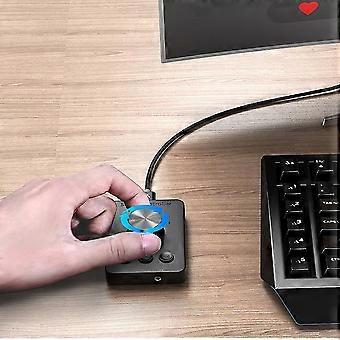
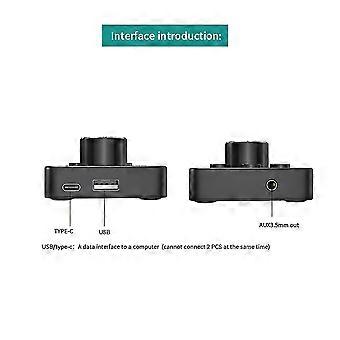
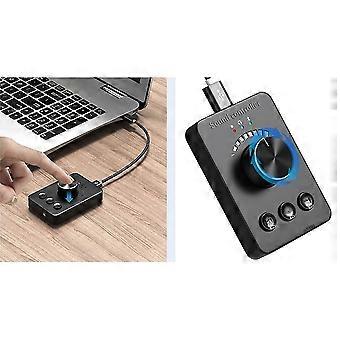
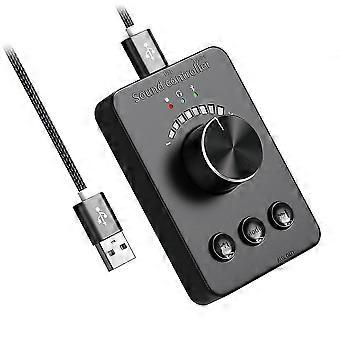
Sound control :The red ON, the knob adjusts the volume of the computer, -key mute, the song up/ song switch.3.5mm audio output : Blue ON, wired earphone is inserted into AUX OUT hole, computer voice is output from earphone.Bluetooth Transmit: When the green ON, long press the MODE button to enter bluetooth search, and the green light flashes quickly to automatically match around bluetooth headset, Bluetooth speaker and other devices, the green light is steady on after successful pairing NO: CP100; Bluetooth version: Bluetooth 5.1; Bluetooth protocol: A2dp/avctp/avdtp/avrcp/hfp/spp//att,gap/gatt/rfcomm//l2cap; Music : MP3, WMA, APE, FLAC, AAC, MP4, M4A, WAV, AIF, AIFC; Signal to noise : greater or equal to 90dB; system: WinXP 7 8 10, os, plug and play, no driver requiredNote: different Bluetooth headsets / speakers different schemes and protocols to search for connections. The time will be different. If the search fails, please turn on Bluetooth to check. Turn on the Bluetooth headset, unplug the USB cable and plug it in again.bluetooth Transmit1. press the mode button to enter the Bluetooth transmission mode, and the green light flashes slowly (connecting) Cp100 will automatically reconnect the Bluetooth headset / speaker was paired successfully last time.2. For new Bluetooth headset, press the moed button for , the green light flashes quickly. To enter the Bluetooth search mode, automatically search and a new Bluetooth headset/speaker. If not the Bluetooth headset, continue to press the mode button to search and pair the Bluetooth headset.3. Press and hold the mode key to access the Bluetooth headset from (A) to (B), (B) to (C), (C) to (D).If you need to reconnect the Bluetooth headset (A), you need to unplug and plug in the USB cableGreen light flashes slowly: reconnect (automatically the last Bluetooth headset / speaker)Green light fast: Bluetooth search in (search and new Bluetooth devices)The green light is always on: it has been connected and paired successfully. (wait 10 seconds for sound transmission) Bluetooth switching: long press the mode key to automatically search and the Bluetooth deviceColour: BlackMaterial: PlasticPackage Contents:1 x controller1 x USB cableOnly the above package content, other products are not included.Note: Light and different displays may the color of the item in the a little different from the real thing. The measurement allowed error is +/- 1-3cm.
  • Fruugo ID: 208897620-445003189

产品安全信息

请参阅下面列出的特定于该产品的产品安全信息

以下信息由销售该产品的独立第三方零售商提供。

安全警告: WARNING: TO AVOID DANGER OF SUFFOCATION, KEEP THIS PLASTIC BAG AWAY FROM BABIES AND CHILDREN.

配送 & 退货

在 24 小时内发货

  • STANDARD: 免费 - 之间的交付 周三 31 十二月 2025–周四 08 一月 2026 - 免费

从 中国 送货。

我们会争取将您订购的产品按照您的规格完整地配送给您。不过,万一您收到不完整的订单,或收到的产品与您订购的不同,或者有其他原因让您对订单不满意,您可以要求全部或部分退货,您将收到相应产品的全额退款。 查看完整的退货政策

产品合规详细信息

请参阅下面概述的针对该产品的合规性信息。

以下信息由销售该产品的独立第三方零售商提供。

制造商:
以下信息概述了在Fruugo销售的相关产品的制造商联系信息。

  • CREA
  • CREA
  • 1-3 Boulevard Charles de Gaulle Colombes 92700 FR
  • Colombes
  • FR
  • 92700
  • xmchymx@outlook.com
  • 86-13312976782
  • https://www.fruugo.co.uk/shenzhenshi-wenqiang-trading/m-15608

欧盟负责人:
以下信息概述了欧盟负责人的联系信息。该负责人是位于欧盟的指定经济运营者,负责有关销售到欧盟的相关产品的合规义务。

  • E-CrossStu GmbH
  • E-CrossStu GmbH
  • Mainzer Landstr.69,60329 Frankfurt am Main,Hessen, Deutschland
  • Frankfurt am Main
  • DE
  • 60329
  • E-CrossStu@web.de
  • +4969332967674
  • https://www.fruugo.co.uk/shenzhenshi-wenqiang-trading/m-15608